When the Assistant Is Wrong
The assistant is an AI. It writes its answers itself, from Typograph's documentation and from what it finds in your organizations. Most answers are right, but an answer can be wrong, incomplete or out of date, even when it sounds sure of itself. That is why the panel says AI can make mistakes under the field.
Why an Answer Can Be Wrong
- It predicts text. The assistant puts an answer together from patterns in language. It does not know whether a sentence is true, so it can state something that sounds right and isn't.
- It can misread your question. A short or ambiguous question may be answered as a different question than the one you meant.
- It only sees what it looks up. For a how do I… question it searches this documentation; for your work it looks at what your rights let it see. What it did not look up, it can only guess.
- Things change. A page, a template or a team may have changed since the assistant read it in this conversation.
How to Check an Answer
- Open the sources. Under an answer that used the documentation, the pages it read show as cards. Click one to read the whole page and compare.
- Look at the cards it found. Templates, projects and teams the assistant names appear as cards that open them: check the item itself rather than its description.
- Read the plan before you run it. The assistant never changes anything without a plan you see first. Check every step, and click Cancel or Adjust when one is not what you want. Deleting, inviting and anything that costs credits always wait for your go-ahead.
- Ask how it knows. Where did you find that? or Which page says so? makes it show its source, or say that it has none.
What to Do When an Answer Is Wrong
- Say what is wrong in the same conversation, such as That template is in the team Brochures, not Flyers. The assistant takes it into account in its next answer.
- Ask more precisely. Name the template, team or page you mean, and the result you expect.
- Start a new conversation with + at the top of the panel when an answer keeps going in the wrong direction: a new conversation starts without what was said before.
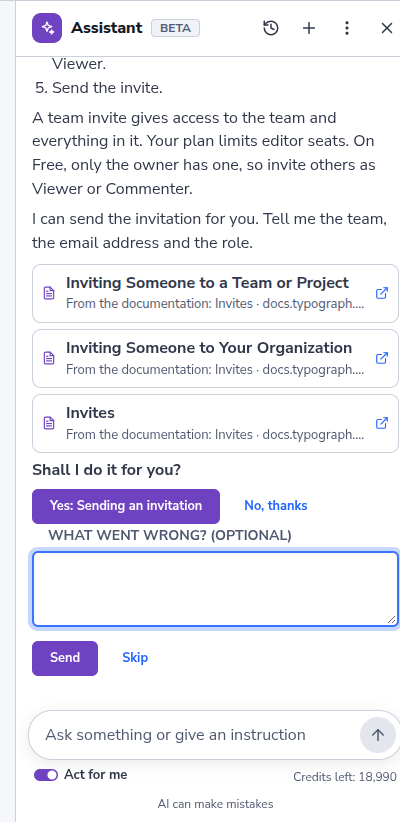
- Let us know. Click the thumbs down under the answer. Under What went wrong? (optional), say what was wrong and click Send, or click Skip to send the thumbs down alone. We read this feedback to improve the assistant.
Did the assistant change something you did not mean to change? A plan that ran shows Undo where the change can be undone. Otherwise, change it back yourself, or ask support for help.